


AI Music & Song Generator
4.6408.00 Reviews
App Specs
- Version
- 3.1.3
- Updated On
- License
- Free
- Downloads
- 1,000,000+
- Developer
- One Music Player
- Categories
- Music & Audio
- Platform
- Android
Screenshots
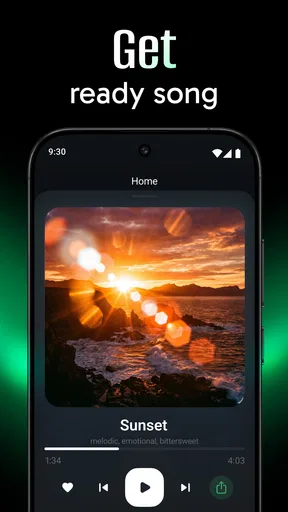
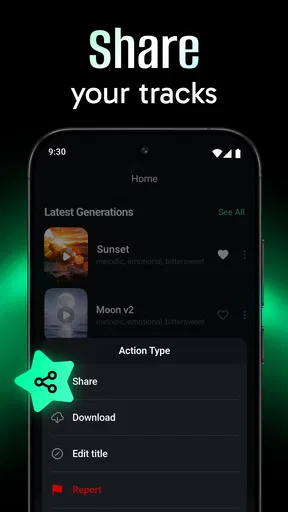
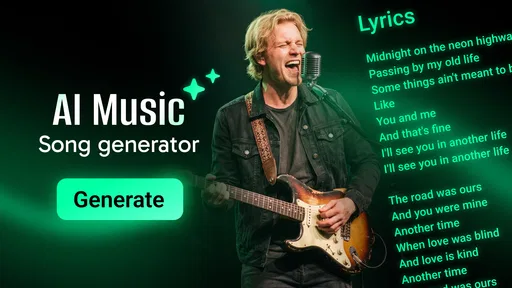
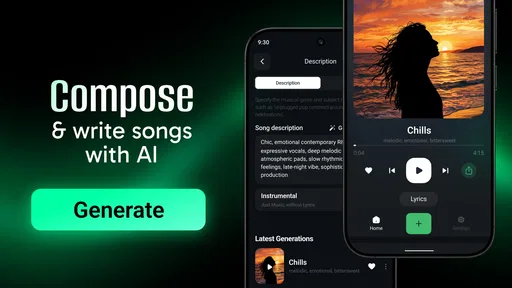
 Analysis by AppCompare
Imagine having a personal DJ, composer, and band all rolled into one neat little package on your phone. That's what AI Music & Song Generator aims to be. I gave it a spin, and let me tell you, it’s like stepping into a world where creativity meets technology in the coolest way possible. If you’re into music, or even if you just enjoy humming along, this app might just hit the right note for you.
A useful fit for quick creative experiments
The most practical way I’d use an AI song maker is to begin with a specific purpose, not an open-ended demand for a finished hit. Maybe you need a playful tune for a personal video, a rough musical idea to build on later, or a way to hear how a lyric might feel when sung. Those small goals make it easier to judge whether a generated result is useful, because you can compare it with the mood or message you had in mind.
For example, imagine you have a long commute and a few lines of lyrics in your notes. You could use that time to test whether the words suggest a bright pop direction or something slower and more reflective. I’d treat the result as a sketch: keep the parts that inspire you, note what feels wrong, and revise the prompt or wording for another attempt. That approach is more rewarding than expecting an app to understand a vague idea perfectly on the first try.
This kind of workflow can suit curious beginners, songwriters looking for a spark, and people who want a custom musical idea without learning a full production setup. It is less suitable if your main goal is precise control over every note, a polished multitrack recording, or a dependable substitute for working with musicians. In those cases, a conventional digital audio workstation or a human collaborator will usually give you more deliberate control.
How it fits beside other music tools
AI music generation sits in a different lane from streaming apps and traditional music-making software. A streaming service is the better choice when you want to listen to finished tracks; a DAW is better when you want to arrange, record, and edit with detailed control. This app’s appeal is the possibility of turning a brief idea into a song-like result with less musical setup. That convenience is useful, but it also means the creative process may feel less hands-on than building a track instrument by instrument.
The app’s store summary names Suno AI and Udio AI as the services powering its generation. That gives a useful clue about its central purpose, but I wouldn’t assume that every workflow or capability from those services is available in exactly the same way here. If you already use another music generator, compare the actual results and the steps it takes to reach them rather than choosing based on a familiar name alone.
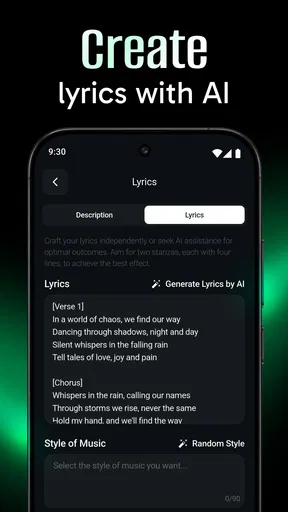
A helpful tip is to change one part of an idea at a time. If a result is too energetic, try adjusting the mood or tempo direction without also rewriting every lyric and style cue. Keeping changes narrow makes it easier to tell what helped. For lyrics, shorter lines with a clear emotional point can be easier to shape than a dense paragraph; you can always add detail once the basic direction feels right.
Worth Reading Before You Choose

Flipboard Shows What News Apps Must Do Beyond the Feed

Switching to Android Auto Means Rethinking Your Driving Routine

Google Calendar Makes a Crowded Week Easier to Manage

Ludo King Makes the Most of the Minutes Between Plans

Baby Panda World Brings Quick Play to Modern Phones, but Its Game Library Feels Busy

ESPN’s Live Game View Makes Following Close Games Easier
Unleashing Your Inner Mozart
So, what’s the big deal with AI Music & Song Generator? Well, it’s all about putting the power of music creation right at your fingertips. Whether you fancy yourself a budding Beethoven or just want to create some catchy tunes, this app has something to offer. It uses sophisticated AI algorithms to help you craft melodies, harmonies, and even full-fledged songs without needing a degree in music composition.
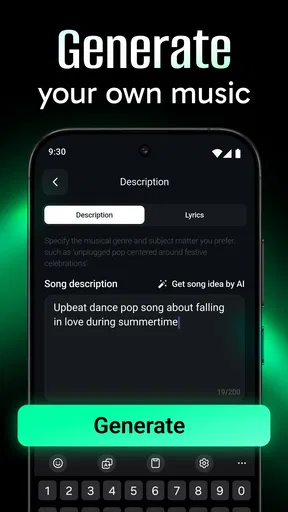
Getting started is a breeze. As soon as you open the app, you’re greeted with a friendly interface that walks you through the basics. Even if you’re a total newbie, you’ll find yourself navigating through options like a pro in no time. I was particularly impressed by how intuitive the controls are. You can tweak tempos, choose instruments, and even add special effects with just a few taps. It’s like magic!
Features That Hit the Right Note
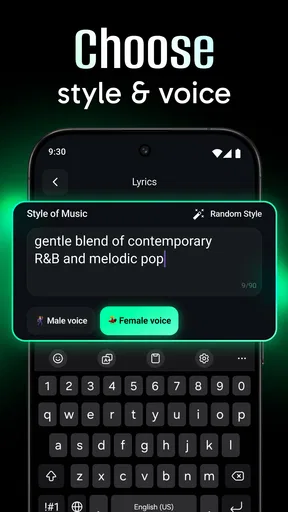
Now, let’s dive into some of the features that make this app stand out. The first thing that caught my attention was the vast library of instrument sounds. From classical pianos to electric guitars, it’s all there. You can mix and match sounds to your heart’s content. The app also lets you experiment with different musical genres, whether you’re into jazz, rock, pop, or something more eclectic.
Another cool feature is the AI-powered suggestion tool. It’s like having a music coach guiding you along. If you’re stuck or unsure about what to do next, the app suggests chord progressions and melodies that fit your style. It’s a great way to overcome creative blocks. Plus, the real-time editing capabilities mean you can hear changes instantly, helping you perfect your masterpiece on the fly.
Collaborate and Share Like Never Before
Music is meant to be shared, and this app makes it incredibly easy. You can collaborate with friends or fellow musicians, sharing your creations directly through the app. Imagine co-writing a song with someone halfway across the world! It’s all possible here. The sharing options are pretty robust, allowing you to export your tracks in various formats or upload them directly to social media platforms.
Moreover, the app encourages feedback and interaction through its community section. You can join forums, participate in challenges, and even get feedback from other users. It’s a vibrant space where you can learn, grow, and maybe even discover the next big trend in music.
Perfect for Every Skill Level
Whether you’re just starting out or have been playing instruments for years, this app caters to all skill levels. Beginners will appreciate the step-by-step tutorials and helpful guides, while seasoned musicians can dive right into advanced features to fine-tune their compositions. The app is designed to grow with you, offering more complexity and options as you become more comfortable.
What’s more, it doesn’t require any special equipment. Just your phone or tablet, and you’re good to go. This makes it incredibly accessible for anyone with a passion for music.
What to expect from the current version
The current release is version 2.0.0.4, while the app first appeared on June 28, 2024. Those details establish where the product stands now, but they don’t by themselves show which individual tools have changed between releases. I’d therefore judge it by what you can do in the version on your device, rather than assume a particular feature is new or improved because of the version number.
For someone who already has the app, the sensible question is whether it still serves the job they installed it for: turning a prompt or lyric idea into something they can listen to and refine. If it does, there may be no reason to change a familiar workflow just because a newer version is available. If you’re new, the current release is the place to start, and it’s worth testing a few contrasting ideas before deciding whether its creative approach suits you.
It is a free app, with optional in-app purchases ranging from $0.99 to $99.99 per item. I’d keep that range in mind before getting attached to a workflow that might depend on paid options. You can start by exploring what is available without spending, then decide whether an additional purchase genuinely solves a need you have. The app is rated for Everyone and requires Android 6.0 or later, useful details if you’re checking device suitability or helping someone younger explore music tools.
Where the experience may fall short
AI-generated music can be a starting point rather than a final answer. A song may capture the broad mood you want yet miss a particular phrase, sound too predictable, or fail to match the rhythm you imagined. That is not necessarily a reason to abandon the app; it is a reminder to treat generation as an iterative process. Save the useful idea, adjust one element, and listen again instead of expecting a single attempt to settle everything.
There is also a meaningful difference between generating a song and learning how to compose one. If your aim is to understand harmony, improve at playing an instrument, or develop exact production skills, a generator may give you inspiration but not the depth of practice you need. I’d pair it with lessons or a more hands-on music tool for that purpose. Likewise, anyone planning to publish or use generated music in a commercial project should check the app’s current terms and the relevant platform rules before relying on a track; that is a sensible step with any AI-created material.
One practical way to avoid frustration is to keep a small prompt notebook. Write down the wording that produced a promising result, along with what you wanted to change. That makes it easier to return to an idea later and compare variations, instead of repeating the same broad prompt and wondering why the outcomes feel similar. It also helps separate a problem with the musical direction from a problem with the lyric itself.
Who should give it a try
One Music Player’s app has a 4.5 average rating from around 15,000 ratings, and it has passed one million installs. Those figures suggest that many people have tried it, but they can’t tell you whether its particular creative workflow will match your taste. I’d recommend it most to someone who enjoys experimenting, wants a low-friction way to explore song ideas, or needs a musical sketch to react to. If you prefer complete control and predictable results, a conventional production tool is likely a better fit.
Before deciding, try a small, clear task: create a short idea for a specific mood, then see whether the result gives you something you can use or build on. Notice how much editing you want to do and whether the app’s available options make that easy. That quick test will tell you more than chasing a supposedly perfect output, and it keeps the app in its strongest role: a creative partner for getting unstuck, not a replacement for every part of making music.
The Verdict: A Must-Try for Music Lovers
Overall, AI Music & Song Generator is a delightful mix of fun and functionality. It’s packed with features that can transform anyone into a music maker. Whether you’re looking to create a viral hit or just want to have fun experimenting with sounds, this app is worth checking out.
In a world where technology constantly reshapes our experiences, this app stands out as a testament to what’s possible when creativity and AI come together. So, if you’ve ever dreamed of creating your own music, give it a try. Who knows? You might just create the next chart-topping hit!
Pros
- Easy-to-use interface for beginners.
- Wide variety of music styles available.
- Fast processing and song generation.
- Supports exporting to multiple formats.
- AI learns and improves over time.
Cons
- Limited free version features.
- Occasional repetitive outputs.
- Requires internet connection.
- Subscription can be pricey.
- Not ideal for professional use.
FAQs for AI Music & Song Generator
What platforms is the AI Music & Song Generator app available on?
The AI Music & Song Generator app is available on both Android and iOS platforms. Users can download it from the Google Play Store or the Apple App Store. It’s designed to work seamlessly across various devices, ensuring a smooth user experience whether you're using a smartphone or a tablet.
Does the app require an internet connection to function?
Yes, the AI Music & Song Generator app requires an active internet connection to access its full range of features. This is because the app utilizes cloud-based AI technology to generate music and songs, ensuring high-quality outputs and real-time processing. Offline usage may limit some functionalities.
Is there a free version of the app available?
The app offers a free version with limited features, allowing users to explore basic functionalities. For advanced features and an ad-free experience, users can upgrade to a premium subscription. This ensures users can try before committing to a purchase, making it accessible to all music enthusiasts.
Can I export and share the music I create with the app?
Absolutely! The AI Music & Song Generator app allows users to export their creations in various formats, making it easy to share music on social media or with friends. This feature is invaluable for musicians looking to showcase their work or collaborate with others digitally.
How user-friendly is the AI Music & Song Generator app for beginners?
The app is designed with an intuitive interface that is perfect for both beginners and experienced users. It provides step-by-step tutorials and helpful tips throughout the creative process, ensuring that even those new to music production can easily navigate and enjoy the app’s features.


